TC Electronic
Konnekt 6 - Firewire Interface

Additional Photos:
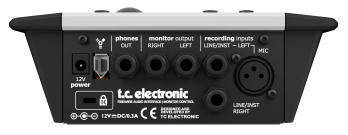
Desktop Konnekt 6 offers the same high quality recording features as the rest of the Konnekt line of interfaces, but in a desktop design that allows you to focus on performance rather than technology. Bundled with Cubase LE4 - Desktop Konnekt 6 has all the features you need to instantly record instruments and vocals into your Mac or PC.
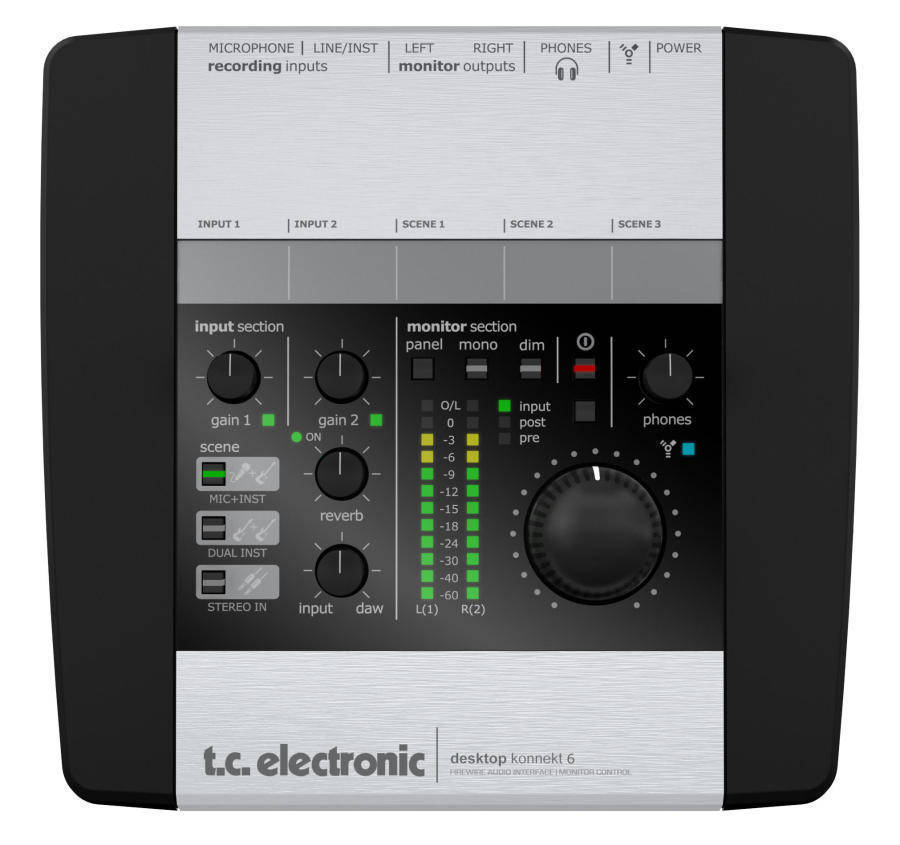
The volume control is the knob that you use all the time. Therefore it is great that it sits right where you want it: always within reach. With a volume control independent from the computer - between the computer and the active speakers - you can always turn down the volume, no matter what your computer does.
The high resolution gives you precise information about levels. With clear level indication, you can always monitor the level of the input signal and if you're near clipping. You can also choose to use the meter for mastering purposes.
For monitoring convenience, the reverb is available as part of your monitor mix. You can control the reverb level directly from the top panel of Desktop Konnekt, and you can set reverb parameters using the control panel on the computer.
Use the direct monitor knob to control the direct monitor level directly from the top panel of Desktop Konnekt. Together with the DIM switch and the MONO switch you have all the monitor functions you need at hand.
With Scene select you can easy access three independent scenes or "setups". The three default presets are for Microphone and guitar, two guitars/basses, a stereo line signal.
The control panel gives you full control over your monitor mix, including the M40 Studio Reverb.
Q & A
Reviews

Protect your investment with the Long & McQuade Performance Warranty
A warranty can be a very important factor when making a buying decision. Because repairs can be very expensive in terms of parts and labour costs, manufacturers usually only provide one year limited warranties that generally only cover items that malfunction due to a manufacturer’s defect. With an important purchase such as a musical
instrument or piece of studio gear, however, many people want to have the peace of mind in knowing that their investment will be protected should the product no longer be performing at 100%.
Because of this, Long & McQuade provides our customers with a FREE one-year Performance Warranty on most of our products. The Long & McQuade Performance Warranty supplements the manufacturer’s warranty to ensure that our customers receive complete “no hassle” warranty coverage within their first year.
How does the Long & McQuade Performance Warranty differ from most manufacturers' warranties?
- Performance Guarantee: Normal wear and tear is covered, so your product will be performing as well as the day you purchased it for the entire duration of the coverage. Band and Orchestral Performance Warranty does not include replacing pads or cleaning for woodwind instruments, unless deemed necessary by our repair staff. Ultrasonic cleaning for brass instruments will be provided if deemed necessary by our repair staff, but is not routinely offered under the Performance Warranty.
- Product Replacement: If your product cannot be fixed or costs too much to fix, we will replace it with the equivalent model for no additional charge. If this is not possible, a full refund will be provided.
- No Lemon Policy: Your product will be replaced should the same problem occur multiple times.
- Convenient: Easy drop off and pick up of the product at any Long & McQuade location.
- Guitar Setup: Guitars purchased at Long & McQuade come with 1 free setup, to be redeemed within 1 year for new guitars and 90 days for used guitars.
- Loaners Available: A loaner product may be given while the product is being repaired.
- Power Surge Protection: Your product is covered even if damaged from a power surge.
- Accessory Coverage: Any peripheral devices or accessories that come with your product (i.e. foot pedal, case) are also covered.
- Commercial Use Coverage: Music and recording professionals who purchase gear for “heavy-use” commercial purposes will still be covered.
Long & McQuade reserves the right to restrict the purchase of additional years of Performance Warranty. Used products come with a 3-month Long & McQuade Performance Warranty. Some products (i.e. computers, software, cymbals and other items) are covered only by the manufacturer‘s warranty. Consumables (i.e. strings, reeds, drum sticks, batteries, tubes, cross faders) are excluded as they are designed to be replaced. Cosmetic Damage, Accidental Damage, or problems caused by Humidity or Temperature Issues are not covered. Speakers damaged by overpowering are generally not covered. Our coverage does not provide compensation for loss of use. As of June 2018 the Performance Warranty is no longer transferable. The warranty is only valid in Canada.
Purchasing additional years of coverage
Some manufacturers provide warranties for longer than 1 year; however, these are usually limited warranties that do not provide the same coverage as the Long & McQuade Performance Warranty. Customers interested in more complete and convenient (but not necessarily longer) coverage are still able to purchase additional years of the Performance Warranty.
If you are interested in receiving this coverage for longer than one year, you have the option of purchasing additional years of the Performance Warranty. The pricing is as follows:
- NEW products: 4% of the current new selling price to double the warranty from 1 year to 2 years. 4% for each additional year.
- USED products: 4% of the current new selling price to increase the warranty from 3 months to 1 year. 4% for each additional year.
- GUITARS: 4% of the current new selling price to double the warranty from 1 year to 2 years. 4% for each additional year. $45 maximum. An additional free setup is not included with additional purchased years of Performance Warranty.
- BAND and ORCHESTRAL instruments: 4% of the current new selling price to double the warranty from 1 year to 2 years. 4% for each additional year.
Great Additions
Reserve in Store

| Product | SKU | Qty |
|---|---|---|
| Konnekt 6 - Firewire Interface | 282814 |