Nektar Panorama CS12 Channel Strip Controller Panorama CS12 Channel Strip Controller

Additional Photos:
Product Videos:


Great Additions
Description
The complete control experience for Cubase & Nuendo
Panorama CS12 connects directly to Steinberg's Cubase & Nuendo DAWs and works immediately with existing projects. Control the mixer channel strip, select insert plugin slots and control any Steinberg plugin or hosted VST/VST3 plugin.
There are options to write automation, control parameters at high resolution, navigate the timeline and click to control any parameter (AI style). Panorama CS12 gives you the most extensive integration ever seen for Cubase & Nuendo.
Channel controls
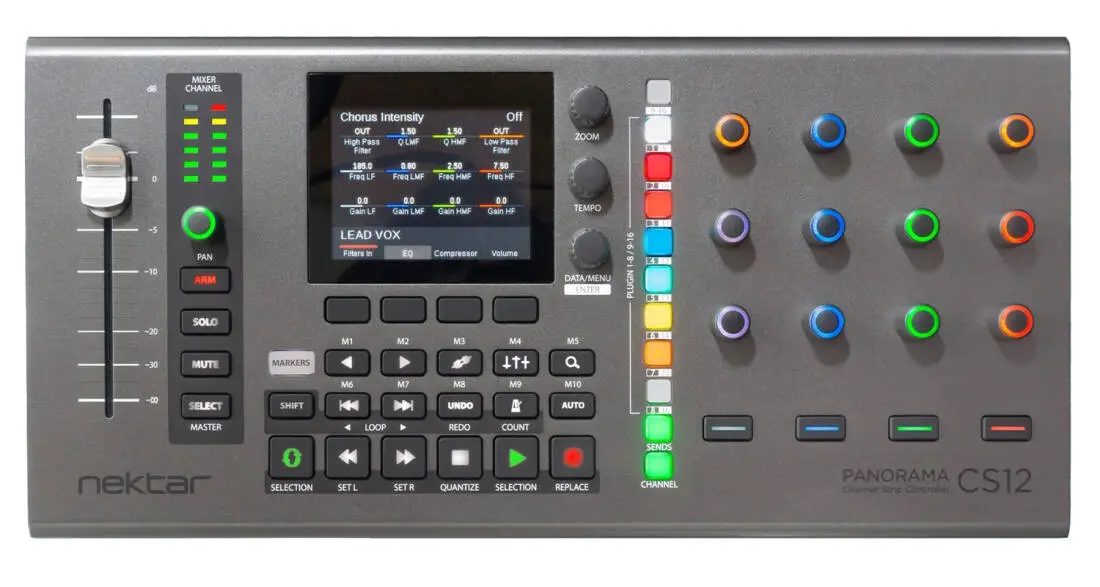
When a channel or track is selected in Cubase, Panorama CS12 is ready for control. The 100mm fader moves to the position of the current channel's volume setting and the channel colour illuminated pot controls pan. The display updates to show the insert plugin list, ready for selection. There are also buttons for track record arm, solo and mute plus a 6 segment VU meter so you can monitor activity on the track.
Get into the Detail with Fine Control
Traditional 7 bit MIDI resolution is perfect for complete one rotation control of parameters. It does however not give you the option to make finer detailed adjustments so we implemented the Fine (Magnifier) button. With Fine active, all parameters are controlled at their maxime resolution or up to 14 bit (10x standard MIDI). With Fine you can really get in to the detail.
Channel Strip Modules
The channel strip and it's 6 modules Gate, Compressor, EQ, Tools, Saturation and Limiter are key features of the Cubase mixer. When Channel mode is selected, Panorama CS12 uses the 8 plugin slot buttons to select modules for control. Press the button illuminated in the colour of the module and control it's parameters. Better still, combine your favorite parameters in 2 user pages using the MIDI Remote Manager.
Each module can be bypassed by holding shift and pressing module buttons or by pass all by pressing the [9-16] button.
Sends
Up to 8 channel sends can be controlled for each channel. Press the dedicated Sends button and start adjusting send levels. A pre/post page option enables send routing to be set to pre or post fader.
Quick Controls
If Quick Controls are already configured, Panorama CS12 will be able to control your track or plugin Quick Control's immediately. Track QC's are a powerful way to control instruments, MIDI effects, a mix of plugin parameters, 8 mixer channels or whatever else you need.
Selected Parameter (AI)
Selected Parameter works similarly to the fabled "AI knob". Just click a parameter and control it using the high resolution motorized fader. Open multiple plugin windows from across your project and just click and control parameters freely. The fader jumps to the parameters current position with updating easy from there. Instruments, effects, channel parameters are all controllable with a simple click.
Automation
Automation can be activated directly from Panorama CS12. Better still, you can also select automation modes like read, touch, auto-latch, cross-over etc. There are even options that are specific to CS12, such as Auto-touch. With Auto-touch selected, automation is only written when the fader is touched. This allows you to freely adjust any other control without accidentally causing automation capture.
Instrument Control Options
Plugin instrument parameters can be controlled using any of 3 different methods:
• Plugin Quick Controls
• Selected Parameter (AI)
• Nektarine plugin host
Nektarine is capable of managing thousands of instrument parameters and uses the same mapping technology used to control plugin inserts via the Steinberg DAW integration. Read more about how Nektarine works with Cubase & Nuendo.
Plugins
Panorama CS12 excels at controlling plugins. You can control any plugin without looking at the plugins' UI so you can focus on creating, composing and editing.
Panorama CS12 is pre-mapped for all the included Steinberg insert fx plugins. Clever mapping ensures that you only control the parts of a plugin that are active (think VocalChain or MultiTap Delay) with colour coding used throughout.
Many commonly used plugins are also pre-mapped and even unmapped plugins can be immidiately controlled via 2 pages of default mapping.
Panorama CS12 dedicates 12 RGB illuminated 360 pots, 4 display buttons and an additional 4 RGB LED buttons to plugin control. Every control can be assigned on multiple pages ensuring as a complete plugin experience, with no parameter left behind.
Via the ControlCore mapping system, it stores all settings in unique files so they can be ported to other computer systems and ensure compatibility with other DAWs in the future.
Any plugin that presents its parameters for automation in Cubase, can be controlled from Panorama CS12. There is no wrapper or plugin host. It just works.
Function Buttons & Timeline Navigation
Eighteen dedicated function buttons and the 3 display encoders give direct and secondary access to many Cubase features. You can navigate tracks or channels, open/close mixer and plugin windows, navigate the timeline using encoders or buttons, go to and set locator points, move the current locator loop, set and select markers, undo/redo Cubase changes, activate metronome and it's countin feature, set tempo plus more.
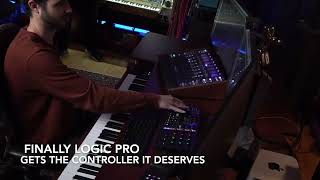
The Logic Pro Channel Strip Controller
Panorama CS12 does what no other controller can do: Give full control of all Logic Pro channel strip parameters including plugins. The entire workflow is designed from the ground up, which enables astonishing features, with a workflow never seen on a control surface before. Panorama CS12 is the Logic Pro Channel Strip Controller.
Logic Pro Channel Control
A 100mm ALPS motorized fader follows the selected mixer channel when you work. With up to 14 bit resolution, you get detailed control with touch sensing enabling automation override and update captures in real time.
Paired with a dedicated pan control, as well as buttons for Solo, Mute and Record Arm, you have instant access to all main mixer parameters on the selected channel.
Beyond current channel control, the motorized fader can also be assigned to control Master volume and any parameter on the current channel.
In addition, movement can be disabled temporarily with a simple shortcut to avoid it moving while you are doing open mic recording.
Instrument Control Across All Four DAWs
Panorama CS12 now delivers instrument plugin control in every supported DAW (Fender Studio Pro, Cubase/Nuendo, Logic Pro, and Reaper). Mapping is included out of the box for each DAW's own instruments as well as a wide range of popular third-party plugins. Users who want to go further can build their own instrument mapping directly, either by learning parameters to controls from Panorama CS12 itself, or by using Nektar's Nektarine plugin application to create complete page structures, rename parameters, and fine-tune assignments. A new option to use the Tempo encoder for plugin preset selection is also included. This works both with instrument and effects plugins, if presets are available in the DAW's browser.
Fender Studio Pro Macro Control and colour Coding
Panorama CS12 unlocks deep integration with Fender Studio Pro's unique features. The Channel button provides instant access to Studio Pro's macros with knob 18 and button 14 macros fully assigned and controllable from the hardware. Fender Studio Pro (as well as Studio One 6 and 7) have extensive custom colour options which Panorama CS12 takes advantage of, including the individual colour-coding of macros.
Features
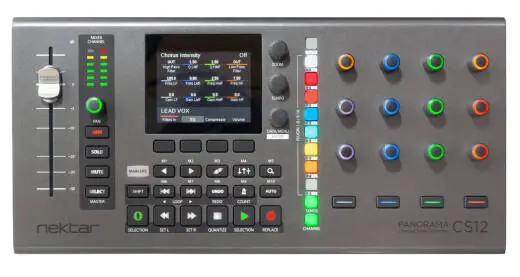
• Long-throw 100mm motorized fader• Endless (360) potentiometer with RGB illumination
• 6-segment LED meter for real-time display of channel volume
• Dedicated buttons for channel Arm, Mute, Solo and Select parameter control
• colour TFT display used for plugin list display and control assignments. In the image an SSL EQ is controlled
• 3 display encoders. The tempo encoder can be assigned other functions such as vertical zoom or timeline control
• Buttons below the display are used for parameter control or page selection
• 18 function buttons used as indicated with additional secondary functions accessible using Shift
• 11 RGB illuminated buttons for selection of plugin bank 9-16, plugin slots 1-8, sends and channel menus
• 12 endless (360) potentiometers with RGB illumination for plugin and DAW control
• 4 buttons RGB illuminated parameter control buttons
System Requirements
- USB class compliant, no driver needed.- Nektar ControlCore installation required. Unit doesn't operate on its own.
- A Nektar account for registration and download of support files.
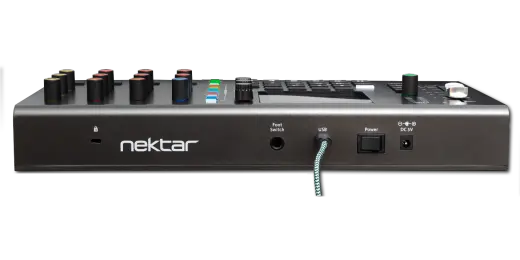
- USB Power Requirement: 500 mA minimum, connect to a USB high power port recommended.
- Mac OS X: 11.5 or later.
- Windows 10 or higher.
- Logic Pro: 10.7.8 or higher.
Dimensions & Weight
- Dimensions: 39 x 18.5 x 6.5 cm- Weight: 0.49 kgs
Includes
- Panorama CS12- Quickstart guide and functional overview. All other documentation is part of the download package.
- USB A to C cable.
Media
Q & A
Reviews
Fantastic Controller
0 of 0 customers found this review helpful

Protect your investment with the Long & McQuade Performance Warranty
A warranty can be a very important factor when making a buying decision. Because repairs can be very expensive in terms of parts and labour costs, manufacturers usually only provide one year limited warranties that generally only cover items that malfunction due to a manufacturer’s defect. With an important purchase such as a musical
instrument or piece of studio gear, however, many people want to have the peace of mind in knowing that their investment will be protected should the product no longer be performing at 100%.
Because of this, Long & McQuade provides our customers with a FREE one-year Performance Warranty on most of our products. The Long & McQuade Performance Warranty supplements the manufacturer’s warranty to ensure that our customers receive complete “no hassle” warranty coverage within their first year.
How does the Long & McQuade Performance Warranty differ from most manufacturers' warranties?
- Performance Guarantee: Normal wear and tear is covered, so your product will be performing as well as the day you purchased it for the entire duration of the coverage. Band and Orchestral Performance Warranty does not include replacing pads or cleaning for woodwind instruments, unless deemed necessary by our repair staff. Ultrasonic cleaning for brass instruments will be provided if deemed necessary by our repair staff, but is not routinely offered under the Performance Warranty.
- Product Replacement: If your product cannot be fixed or costs too much to fix, we will replace it with the equivalent model for no additional charge. If this is not possible, a full refund will be provided.
- No Lemon Policy: Your product will be replaced should the same problem occur multiple times.
- Convenient: Easy drop off and pick up of the product at any Long & McQuade location.
- Guitar Setup: Guitars purchased at Long & McQuade come with 1 free setup, to be redeemed within 1 year for new guitars and 90 days for used guitars.
- Loaners Available: A loaner product may be given while the product is being repaired.
- Power Surge Protection: Your product is covered even if damaged from a power surge.
- Accessory Coverage: Any peripheral devices or accessories that come with your product (i.e. foot pedal, case) are also covered.
- Commercial Use Coverage: Music and recording professionals who purchase gear for “heavy-use” commercial purposes will still be covered.
Long & McQuade reserves the right to restrict the purchase of additional years of Performance Warranty. Used products come with a 3-month Long & McQuade Performance Warranty. Some products (i.e. computers, software, cymbals and other items) are covered only by the manufacturer‘s warranty. Consumables (i.e. strings, reeds, drum sticks, batteries, tubes, cross faders) are excluded as they are designed to be replaced. Cosmetic Damage, Accidental Damage, or problems caused by Humidity or Temperature Issues are not covered. Speakers damaged by overpowering are generally not covered. Our coverage does not provide compensation for loss of use. As of June 2018 the Performance Warranty is no longer transferable. The warranty is only valid in Canada.
Purchasing additional years of coverage
Some manufacturers provide warranties for longer than 1 year; however, these are usually limited warranties that do not provide the same coverage as the Long & McQuade Performance Warranty. Customers interested in more complete and convenient (but not necessarily longer) coverage are still able to purchase additional years of the Performance Warranty.
If you are interested in receiving this coverage for longer than one year, you have the option of purchasing additional years of the Performance Warranty. The pricing is as follows:
- NEW products: Starting at 4% of the current new selling price to double the warranty from 1 year to 2 years. Starting at 4% for each additional year.
- USED products: Starting at 4% of the current new selling price to increase the warranty from 3 months to 1 year. Starting at 4% for each additional year.
- GUITARS: 4% of the current new selling price to double the warranty from 1 year to 2 years. 4% for each additional year. $45 maximum. An additional free setup is not included with additional purchased years of Performance Warranty.
- BAND and ORCHESTRAL instruments: 4% of the current new selling price to double the warranty from 1 year to 2 years. 4% for each additional year.
Reserve in Store

| Product | SKU | Qty |
|---|---|---|
| Panorama CS12 Channel Strip Controller | 802891 |