Opens in a new window
PreSonus Progression 3 - Download


This product is no longer available.
Great Additions
Description
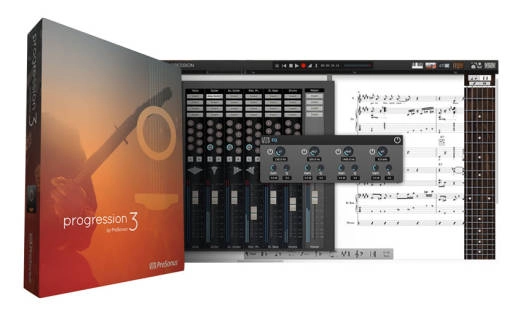
Progression 3 makes it easier than ever for you to write your ideas quickly and includes new effects from PreSonus Studio One, an enhanced chord library, and many notation and publishing improvements.
Notation improvements make Progression 3 even faster and easier to use than previous versions, including an enharmonic spelling tool, cross-staff notation, and new shortcut sets. You also get an enhanced chord library with more library chords, user-created chords, and recent-chord recall.
Major new Progression 3 features include:
• PreSonus plug-ins: Includes three PreSonus Native Effects plug-ins from Studio One: Limiter, Compressor, EQ
• Notation and tab: Many notation and tablature improvements make Progression the fastest and easiest composition software on the planet, including new enharmonic spelling tool, cross-staff notation, layout improvements, and new shortcut sets. There's a new Capo feature, too!
• Chords: An enhanced chord library provides more library chords, user created chords, and Recent Chord Recall
• Look and feel: The user interface has been redesigned to be more consistent with PreSonus' award-winning Studio One DAW
• International localization: Available in English (U.S. and UK), French, German, Japanese, and Latin American Spanish
• Display: Mac Retina display and Windows 8 touchscreen optimization
Other features:
• Enter, edit, and play back tab, notation, or both
• Best playback of any composing software, with samples recorded by Neil Zaza, Victor Wooten, Roy Futureman Wooten, and more
• Acoustic guitar, electric guitar, and bass guitar samples included
• Optional instruments include classical guitar, acoustic fingerstyle guitar, mandolin, and banjo
• Compose on a Mac or Windows computer and continue to edit on iPad and vice versa
• Interactive Entry Tools: keyboard, 24-fret guitar fretboard, drum pad, chord library
• Real-time and step-time MIDI entry
• Extensive chord library with user-created chords and recent-chord recall
• In-store app to add more instruments
• Audition/Entry modes
• Complete audio mixer
• Process audio with PreSonus Native Effects Limiter, Compressor, and EQ plug-ins, as well as reverb and guitar-amp simulator
• See notation and MIDI data on the same staff
• Capo feature
• Quick, simple selection palette
• Full range of guitar functions and articulations including: bends, vibrato, slides, hammer-ons, pull-offs, mutes, whammy-bar techniques, bass slap, harmonics, and more
• Insert text and lyrics
• Quick Undo and Redo
• Sequencer Overlay allows you to see notation and MIDI performance data on the same staff
• Chord and Melody modes
• Easy delete and erase capabilities
• Enter and edit title and composer information
• Convenient file sharing
• Export/email audio
• Import/export Standard MIDI Files
• Native 64-bit support
• Retina display support
• Windows 8 touchscreen support
• Open Arobas Guitar Pro files (versions 3 to 5)
• Search for tablature online
• Free scales and exercises included
System Requirements:
Mac:
• Mac OS X 10.7 or later (32-/64-bit)
• Intel Core Solo 1.8 GHz processor (Recommended: Intel Core 2 Duo 2 GHz or better)
• 2 GB RAM (4 GB or more recommended)
• 2 GB free hard-drive space
Windows:
• Windows 7 or 8 (32- or 64-bit)
• Intel Pentium 4 2 GHz (Intel Core 2 Duo 2 GHz or better recommended)
• 2 GB RAM (4 GB or more recommended)
• 2 GB free hard-drive space
Notation improvements make Progression 3 even faster and easier to use than previous versions, including an enharmonic spelling tool, cross-staff notation, and new shortcut sets. You also get an enhanced chord library with more library chords, user-created chords, and recent-chord recall.
Major new Progression 3 features include:
• PreSonus plug-ins: Includes three PreSonus Native Effects plug-ins from Studio One: Limiter, Compressor, EQ
• Notation and tab: Many notation and tablature improvements make Progression the fastest and easiest composition software on the planet, including new enharmonic spelling tool, cross-staff notation, layout improvements, and new shortcut sets. There's a new Capo feature, too!
• Chords: An enhanced chord library provides more library chords, user created chords, and Recent Chord Recall
• Look and feel: The user interface has been redesigned to be more consistent with PreSonus' award-winning Studio One DAW
• International localization: Available in English (U.S. and UK), French, German, Japanese, and Latin American Spanish
• Display: Mac Retina display and Windows 8 touchscreen optimization
Other features:
• Enter, edit, and play back tab, notation, or both
• Best playback of any composing software, with samples recorded by Neil Zaza, Victor Wooten, Roy Futureman Wooten, and more
• Acoustic guitar, electric guitar, and bass guitar samples included
• Optional instruments include classical guitar, acoustic fingerstyle guitar, mandolin, and banjo
• Compose on a Mac or Windows computer and continue to edit on iPad and vice versa
• Interactive Entry Tools: keyboard, 24-fret guitar fretboard, drum pad, chord library
• Real-time and step-time MIDI entry
• Extensive chord library with user-created chords and recent-chord recall
• In-store app to add more instruments
• Audition/Entry modes
• Complete audio mixer
• Process audio with PreSonus Native Effects Limiter, Compressor, and EQ plug-ins, as well as reverb and guitar-amp simulator
• See notation and MIDI data on the same staff
• Capo feature
• Quick, simple selection palette
• Full range of guitar functions and articulations including: bends, vibrato, slides, hammer-ons, pull-offs, mutes, whammy-bar techniques, bass slap, harmonics, and more
• Insert text and lyrics
• Quick Undo and Redo
• Sequencer Overlay allows you to see notation and MIDI performance data on the same staff
• Chord and Melody modes
• Easy delete and erase capabilities
• Enter and edit title and composer information
• Convenient file sharing
• Export/email audio
• Import/export Standard MIDI Files
• Native 64-bit support
• Retina display support
• Windows 8 touchscreen support
• Open Arobas Guitar Pro files (versions 3 to 5)
• Search for tablature online
• Free scales and exercises included
System Requirements:
Mac:
• Mac OS X 10.7 or later (32-/64-bit)
• Intel Core Solo 1.8 GHz processor (Recommended: Intel Core 2 Duo 2 GHz or better)
• 2 GB RAM (4 GB or more recommended)
• 2 GB free hard-drive space
Windows:
• Windows 7 or 8 (32- or 64-bit)
• Intel Pentium 4 2 GHz (Intel Core 2 Duo 2 GHz or better recommended)
• 2 GB RAM (4 GB or more recommended)
• 2 GB free hard-drive space
Q & A
There are currently no questions for this product.
Reviews
There are currently no reviews for this product. Be the first to write one!
Reserve in Store

| Product | SKU | Qty |
|---|---|---|
| Progression 3 - Download | 507495 |